
Kroger
The Kroger Co.Shopping
4.562.29K Reviews
- Version
- 100.1
- Installs
- 10.00M
- Age Rating
- Everyone
Screenshots
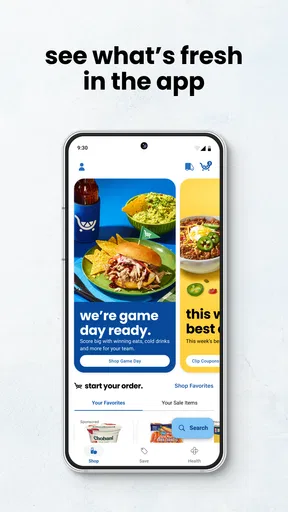
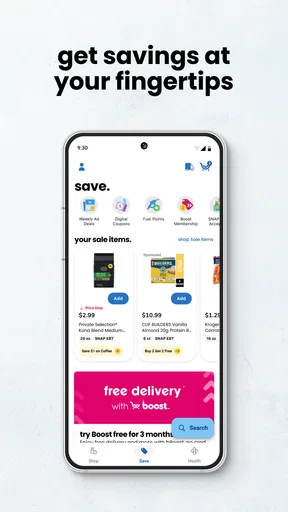
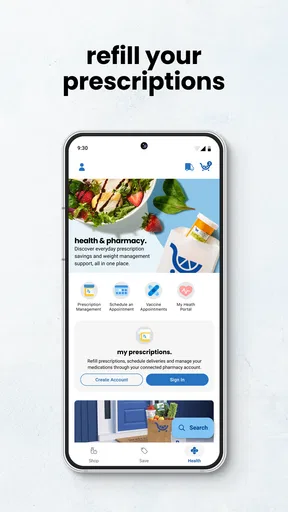
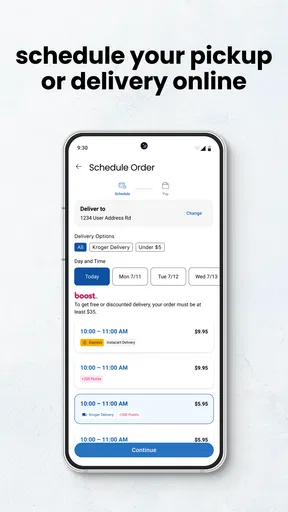
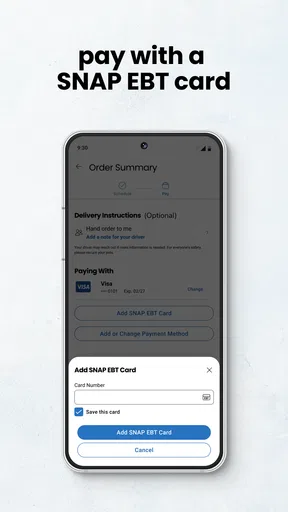
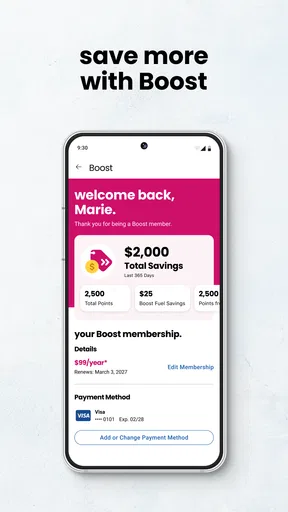
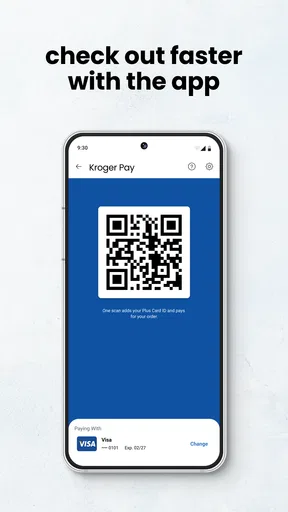
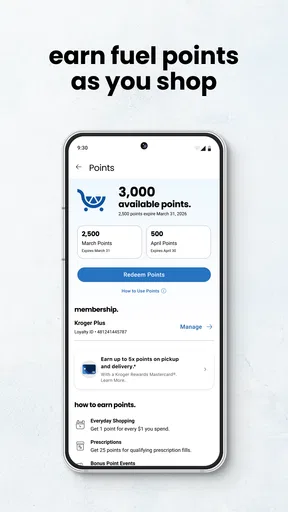
Our Review of Kroger
 Analysis by Appyee
I installed Kroger expecting a straightforward way to check weekly savings, but I found a broader shopping companion from The Kroger Co. It brings coupons, store information, rewards, and a shopping list into one place, which makes it more useful than a simple digital flyer. The real question is whether that convenience survives after the first few shopping trips. In my experience, the answer depends less on novelty and more on whether Kroger is already one of your regular grocery destinations.
As a free shopping app for Everyone, it is easy to try without making a financial commitment. Its long presence on mobile, dating back to late 2010, also gives it the feel of an established store tool rather than a temporary promotional experiment. The current version is 97.2, and it supports Android 8.0 or later. I would recommend it most readily to people who shop at Kroger often enough to use discounts and lists repeatedly, not to someone who visits only occasionally or prefers a store-neutral budgeting app.
What feels useful during the first week
The strongest first impression comes from having several ordinary grocery tasks in the same app. Instead of switching between a store website, a notes app, and a paper flyer, I can use Kroger to look for savings, check store-related information, and build a list. That combination is not revolutionary, but it removes small interruptions from a shopping routine. The app feels most practical when I open it with a specific trip in mind rather than browse it casually.
The coupon area is the feature likely to attract attention first. I can look through available offers before shopping and decide which ones matter to my planned purchases. That distinction is important: the app is more valuable when coupons support a list I already need, rather than encouraging me to buy items simply because they appear discounted. A saving is only useful if the product fits the household budget, meal plan, or normal shopping habits.
The shopping list is similarly simple but meaningful. I like using it as a preparation step, especially when I add items while checking what is missing at home. A list inside the store’s own app has an advantage over a generic notes list because it sits beside the store’s savings and location tools. It creates a single workflow: decide what to buy, check relevant offers, then take the list with me.
Store-finding is another practical part of the first-week experience. When I am away from my usual area, having store information in the same shopping tool is more convenient than searching separately. This is particularly helpful for errands that happen near work, during travel, or after moving between neighborhoods. I would not call this a reason to install the app by itself, but it adds value when combined with regular grocery planning.
The rewards element gives the app a reason to remain installed. A coupon app can feel disposable if it is useful only when a particular promotion appears. Kroger is more coherent because savings and rewards are connected to the broader shopping routine. The benefit is not just opening the app once; it is building a habit of checking it before a trip and keeping the list current.
Its public reception reflects that broad usefulness. Kroger holds a 4.4 average from roughly 374 thousand ratings, with about 61 thousand written reviews and more than 10 million installs. Those figures do not guarantee that every shopper will enjoy the experience, but they suggest the app has become a familiar part of many customers’ grocery routines rather than remaining a niche utility.
A realistic grocery-trip workflow
My preferred workflow starts the evening before shopping. I open the list, remove items I no longer need, and add anything noticed while checking the kitchen. Then I review coupons with that list beside me. This order matters because it keeps the list in control. If I begin with promotions, I am more likely to spend time considering products that were never part of the plan.
Before leaving, I use the store-finding function to make sure I am thinking about the right location. Once inside, the list becomes the main screen I care about, while the savings section acts as a final check rather than the center of the trip. This approach makes the app feel less like an advertising feed and more like a preparation tool. It also reduces the mental load of remembering which deals I intended to use.
A useful but easy-to-miss habit is to review the list immediately after shopping, not only before it. I can remove what was purchased and leave recurring items in place if I know they will be needed again soon. That turns the list into a lightweight household checklist instead of a document I rebuild from nothing every week. The trade-off is that it requires discipline; an untouched list becomes clutter quickly.
Where it beats ordinary alternatives
Compared with a paper list, Kroger is easier to update when plans change and keeps savings close to the items I am considering. Compared with a generic notes app, it is better suited to a Kroger-specific trip because the list, store information, and rewards live together. Compared with browsing a weekly advertisement on its own, it gives me a more active role in planning rather than simply presenting offers to read.
Those advantages are strongest for repeat shoppers. If I buy groceries at Kroger every week, the time spent checking the app can become part of the routine. If I shop across several unrelated stores, a neutral list manager may be better because it keeps all retailers in one place. Kroger is not trying to be a universal grocery organizer in my experience; its value is tied to using the Kroger shopping ecosystem.
Does the value hold from month to month?
After the first few trips, the app’s appeal changes. The excitement of discovering coupons fades, and what remains is the usefulness of the routine. I keep it installed when it helps me prepare faster, remember planned purchases, and make better use of rewards without requiring a separate system. That recurring value is modest but real. It does not need to transform grocery shopping to earn a place on my phone; it needs to remove enough repeated friction.
The best long-term use is a weekly reset. I check the list, review the savings that match my needs, and then stop. This is more sustainable than continuously browsing every available offer. The app rewards a selective approach. I do not need to investigate everything it shows me, and I get better results when I treat it as a tool for decisions I have already started making.
Another concrete advantage appears when household shopping is shared. One person can maintain the list while another handles the trip, reducing the chance of forgotten staples. The app does not replace communication, but it gives the household one visible place to organize the errand. For couples, roommates, or families who already shop at Kroger, that can be more practical than passing around a handwritten note.
I also find the savings tools more useful when I think in monthly categories rather than isolated bargains. For example, I can look for offers that fit planned breakfasts, packed lunches, or cleaning supplies, then make a deliberate choice about whether the discount justifies changing brands or quantities. This prevents the common mistake of measuring success by the number of coupons viewed instead of the quality of the final shopping decision.
The app is free, which makes the long-term test fairly simple: does it save enough time or help enough with store-related planning to justify opening it? For frequent Kroger customers, the threshold is low because the same tasks repeat. For occasional shoppers, the answer may be no. A free app can still create maintenance work, and a tool that is opened only once every few months may not be worth learning.
The maintenance burden is manageable, but not invisible
The main upkeep comes from keeping the shopping list honest. Lists grow stale when items remain after a purchase or when temporary plans are mixed with regular staples. I recommend separating immediate needs from recurring items mentally, even if the app presents them together. Without that habit, the list stops helping and becomes another thing to sort through at the store.
Coupon checking also needs boundaries. I would not spend a long time searching every offer before every trip. A short review focused on items already on the list is more efficient and reduces the temptation to buy for the promotion alone. This is one of the app’s central trade-offs: it can make savings easier to notice, but it can also make shopping feel like an ongoing search for deals.
Rewards add another reason to pay attention, but they can make the routine feel more administrative if I am not organized. The app works best when I give it a defined job: prepare the list, check relevant savings, and support the trip. It works less well when I expect it to make every purchasing decision for me. I still need to compare quantities, brands, and actual household needs.
Store information is useful when I need it, but it is not something I revisit constantly. That means the app’s lasting value is uneven across its sections. The list and savings tools can become weekly habits, while store-finding is more occasional. I see this as a strength rather than a flaw, provided I judge the app by the parts I will genuinely use instead of expecting every feature to be equally important.
What may cause fatigue over time
The first source of fatigue is promotional overload. Grocery savings are helpful when they are relevant, but repeated exposure to offers can make the app feel more like a sales channel than a planning aid. My solution is to decide what I need before browsing. That small change keeps the app aligned with my budget and makes it easier to ignore distractions.
The second is dependence on one retailer. Kroger is a strong choice when it is my regular store, but its usefulness drops if my shopping is divided among different chains, local markets, or delivery services. In that situation, a store-neutral list may be more convenient, even if it lacks Kroger’s integrated savings. Choosing the app means accepting that its best features are connected to one shopping environment.
The third is the possibility of overestimating savings. Seeing a coupon can feel like progress before the checkout decision is made. I still need to consider whether the item is needed, whether the package size makes sense, and whether a preferred alternative offers better overall value. Kroger helps surface opportunities, but it does not remove the need for ordinary price judgment.
There can also be routine fatigue from opening another app before shopping. People who already have a reliable paper list and rarely use coupons may find the extra step unnecessary. I would especially suggest skipping it if the app does not match the stores used by the household. Convenience comes from consolidation, and there is no consolidation benefit when the shopping happens elsewhere.
On the other hand, shoppers who repeatedly forget planned items or miss store savings may experience the opposite effect. For them, the app can reduce avoidable mistakes. The value is not limited to the money attached to a particular offer; it also comes from preparing once and carrying that preparation into the store.
Who should keep it installed?
I think Kroger earns lasting space on the phone for regular Kroger shoppers who want one place for coupons, rewards, store details, and a shopping list. It is also a good fit for households that plan several trips over time and want a repeatable pre-shopping routine. The free price and Everyone content rating make it approachable for a broad audience, while its established user base suggests it has practical staying power.
I would be more cautious for shoppers who use multiple grocery chains equally. A general list app may provide a cleaner overview, especially if the main need is sharing tasks rather than checking retailer-specific savings. I would also hesitate to recommend Kroger as a standalone budgeting solution. It can support thoughtful spending, but it is not a substitute for tracking the total household grocery budget or comparing every available retailer.
People who dislike promotional browsing should use a strict list-first method. That preserves the useful parts without allowing the app to dominate the trip. Conversely, bargain-focused shoppers may enjoy checking savings more often, but they should still set a spending plan before opening the offers. The app can make a disciplined routine easier; it cannot create discipline on its own.
My long-term verdict
After the novelty fades, Kroger remains worthwhile because its most useful features repeat naturally: prepare a list, check relevant savings, confirm the store, and use rewards as part of the trip. I do not see it as an app I would open for entertainment or browse without a purpose. Its strength is practical repetition, and that is exactly why it can become valuable over time.
The experience is not frictionless. Lists need regular cleaning, promotions require restraint, and the app makes the most sense only when Kroger is a meaningful part of the shopping routine. Those limitations are important because they define the audience. Someone looking for a universal grocery planner should choose differently, while a frequent Kroger customer may find that a few minutes of preparation prevent more effort later.
My recommendation is to try it for several planned shopping trips rather than judge it after one coupon search. Build the list before browsing, review only offers connected to real needs, and reset the list after each trip. If that routine saves time or helps you remember purchases, Kroger deserves a permanent place in your shopping toolkit. If it becomes another promotional screen you avoid, uninstalling it is reasonable. For me, its lasting value comes from turning repeated grocery preparation into one manageable habit.
Kroger is available free from The Kroger Co. and remains a focused choice for shoppers who want store-specific savings and planning in one app. Its 4.4 average and broad reach support its reputation as a dependable shopping companion, but the final decision should come from your own routine: the closer your weekly shopping matches what the app is built to support, the more likely it is to keep earning space after the first-week appeal disappears.
Privacy and Permissions
See what permissions an app requests and how it handles your data.
- Location
- approximate location (network-based), precise location (GPS and network-based)
- Photos/Media/Files
- read the contents of your USB storage, modify or delete the contents of your USB storage
- Storage
- read the contents of your USB storage, modify or delete the contents of your USB storage
- Camera
- take pictures and videos
- Wi-Fi connection information
- view Wi-Fi connections
- Other
- view network connections, change network connectivity, connect and disconnect from Wi-Fi, full network access, control Near Field Communication, run at startup, control vibration, prevent device from sleeping, read Google service configuration
Verdict
Strengths of Kroger
- Digital coupons and weekly deals can lower grocery costs.
- Fuel points may provide discounts at participating Kroger fuel stations.
- Shopping lists help organize items before visiting the store.
- Order tracking keeps pickup and delivery updates in one place.
- Kroger Pay offers a convenient checkout option in supported stores.
Limitations of Kroger
- Some deals require a loyalty account or clipped digital coupon.
- Product availability can vary significantly by store and location.
- Delivery fees and service charges may increase the final order cost.
- The app can feel slow when loading large product catalogs.
- Certain features are limited to selected Kroger banners or regions.
Other Releases by The Kroger Co.
View All
Fred Meyer
Shopping3.9

Harris Teeter
Food & Drink4.3
Similar Picks in This Category
View All
SHEIN-Shopping Online
Roadget Business PTE. LTD.4.8

Amazon Shopping
Amazon Mobile LLC4.4


Mercado Libre: Compras online
Mercado Libre4.8

Wish: Shop and Save
Wish US Holdings LLC4.7

Alibaba.com - B2B marketplace
Alibaba Mobile4.4
Frequently Asked Questions
What is the Kroger app used for?
The Kroger app is designed to make grocery shopping easier by combining product browsing, digital coupons, shopping lists, store information, and online ordering in one place. After selecting a preferred store, you can check prices and availability, build a cart, choose pickup or delivery where available, and manage your Kroger Plus account without needing to visit the website separately.
Can I use digital coupons and Kroger Boost offers in the app?
Yes. The app lets you browse available digital coupons, save them to your loyalty account, and apply eligible discounts when you enter your registered phone number or scan your loyalty information at checkout. Some promotions may be limited by location, product quantity, or expiration date. If you subscribe to Kroger Boost, the app can also display membership-related delivery benefits and offers.
Does the Kroger app support grocery pickup and delivery?
Kroger generally offers both curbside pickup and grocery delivery through the app, although available services depend on your local store, address, time slots, and product selection. You can add items to your cart, review substitutions, select a convenient window, and pay digitally. Fees, minimum order requirements, service charges, and delivery availability should be checked before placing an order.
Can I use the Kroger app to refill prescriptions or manage pharmacy services?
In many locations, the Kroger app provides access to pharmacy features such as viewing prescription information, requesting eligible refills, checking order status, and locating nearby pharmacy departments. The exact tools can vary by state, store, and prescription type. Certain medications may require pharmacist approval or cannot be refilled through the app, so the pharmacy may still need to contact you.
Is the Kroger app free, and what information does it require?
The Kroger app is free to download and use, but you need a Kroger account to access many features, including digital coupons, personalized offers, online orders, and loyalty benefits. The app may request location, payment, contact, and account information to provide store-specific services. You can adjust permissions in your device settings, but limiting access may affect some functions.
